
Overview
This article explains how to make revisions to an order after it has been placed and its status has changed from "Open" to "Processing." It details the process for sellers to make and record revisions and how to grant a buyer permission to make their own edits.
Important Notes
- If an order has not yet been placed, its status will be "Open," and it is considered a draft. Any changes made at this stage will be saved automatically.
- Once the seller or buyer clicks "Place Order," the order status becomes "Processing". Both parties will receive an email confirmation, and it is assumed that they have agreed to the order as it is represented. Therefore, any subsequent changes should be made known to both parties.
How-to
Make Revisions as a Seller
- Open a "Processing" or "Complete" order.
- Edit the field(s) first.
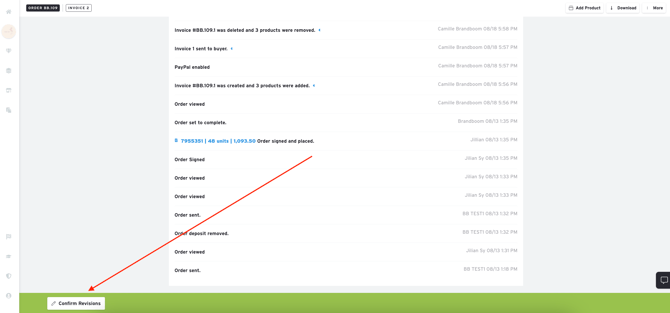
- Click the "Revise Order" button at the bottom of the order form.
- A prompt will appear with a field for you to enter a summary of changes. These notes will be visible in the Order History and in the notification email sent to the buyer if you choose to send one.
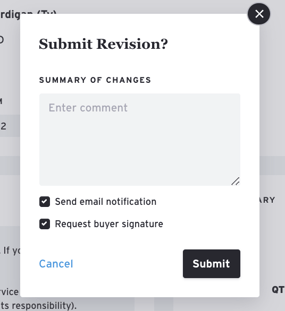
- If you do not want to notify the buyer by email, simply uncheck the box before submitting.
- All revisions will appear at the bottom of the order in the Order History for both parties to see.
Allow Buyer to Make Revisions
Regardless of who originally wrote or placed the order, the buyer is locked out of making any changes once the order has been placed. Sellers are always able to make direct edits to placed orders by saving them as revisions.
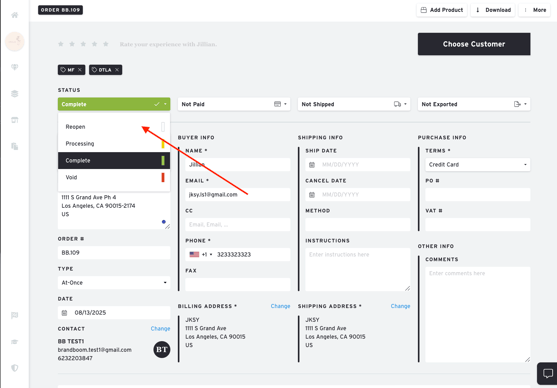
To allow a buyer to make further edits, the seller must change the Order Status from either "Processing" or "Complete" to "Reopen".
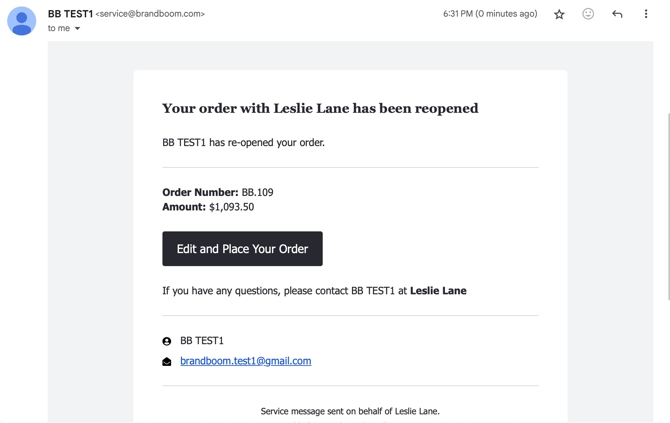
Brandboom will automatically send an email notification to the buyer, letting them know that the order has been reopened for edits. The buyer can then revisit the order and make changes.
NOTE: It is not possible to send the order link directly to the buyer to view or edit.