
Overview
In Brandboom, you can manage your orders using three distinct types of inventory. These options can be set at the individual order level and within your Presentation Settings. Choosing the right inventory type ensures clarity for your buyers and accurate stock management for your brand.
In Brandboom, we allow 3 types of inventory to use with your orders:
1) At-Once or ATS
2) Future and/or Prebook
3) Ship Windows
You will see these options on each Order and in Presentation Settings.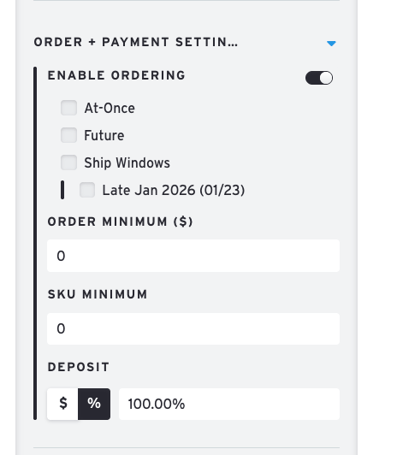
Inventory Type Definitions
Future
Future or Pre-book orders are orders for a future delivery, usually for an upcoming season's goods that have yet to be manufactured. A Ship Date can also be set to indicate the expected delivery date.
Future orders draw from Future inventory if you choose to fill in that column on your SKU view for products. While some businesses cap the quantity for specific Ship Dates and may wish to limit how many units can be sold, we currently do not offer this ability.
Leaving the field blank will allow you to "prebook" an infinite amount of product as orders are placed.
At-Once
At-Once orders, Immediates, or Available to Sell (ATS) are orders for stock that is available or on hand to be fulfilled right away.
At-Once orders is often limited to a specific quantity of available units and will deduct from At-Once inventory if inventory has been set up.
Ship Windows
This is a true, fully-flexible indication of inventory that will be available in the future on specific ship dates. For example, "these pants will be available for shipment in early May, I will have 200 units, and also available in April, where I will have 500 units available".
By categorizing products by their actual ship dates, you gain precise control over your stock and eliminate buyer guesswork. This ensures total transparency for both immediate orders and seasonal pre-orders.
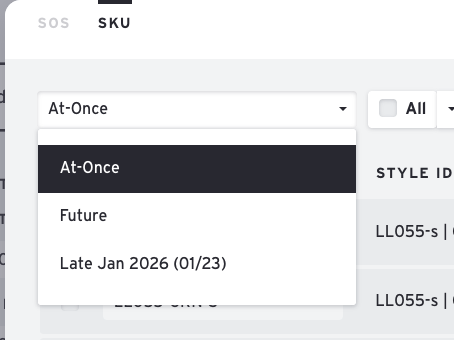 At-Once, Future and a specific Ship Window Date
| Inventory Type | Common Terminology | Best For | Stock Behavior |
| At-Once | Immediates, ATS | Current stock on hand | Deducts from At-Once inventory. |
| Future | Pre-book, Seasonal | Items yet to be manufactured | Draws from Future inventory; allows infinite pre-booking if left blank. |
| Ship Windows | Delivery Windows | Specific future arrival dates | Allows precise stock allocation for multiple delivery dates. |